Showing posts with label SAP Sales and Distribution. Show all posts

SAP Sales & Distribution for End Users - Part 3

SAP Customer Master Data - Continued


Lets continue exploring the Tabs available on Customer Master Screens and If time permits, I  will also tell you about the third and important view of customer master which is Company Code Data.

The different tabs available on General data screen are:

Address
Control Data
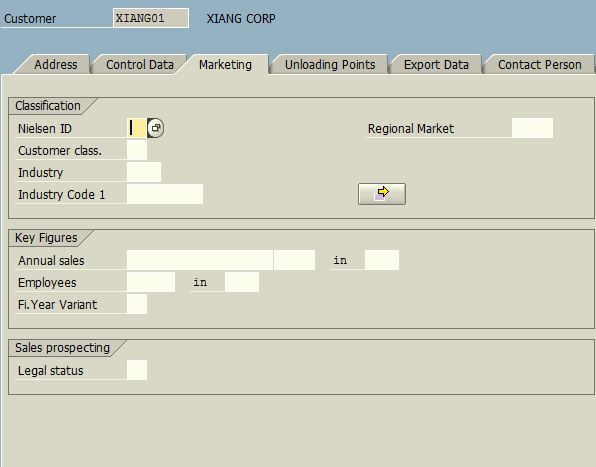
Marketing
Unloading Points
Export Data
and
Contact Person

Address Tab is self explanatory so I will skip that. Control Data tab is used when you want to establish a link between your customer and vendor. You may have customer who is also a vendor to your organization, using this tab you will be able to link a vendor code to a customer code. Apart from that you can also specify your customer's tax related details on this page.

All other tabs can be used to record general data related to the customer.

Remember General Data is common for all the Sales Areas assigned to a Customer Code.

Please go thru the screenshots below and let me know if you have any questions related to any General Data Tab.
VD01 - Create Customer - Control Data

VD01 - Create Customer - Marketing

VD01 - Create Customer - Export Data

VD01 - Create Customer - Unloading Points

VD01 - Create Customer - Contact Person

With these screenshots I finish the General Data Description. In the next session I will show you the screens related to Sales Area Data and what all can be entered there.

The Most Important point to remember is that all information entered on these tabs is common for all the sales areas of a customer. Sales Area, if you recall, is nothing but a combination of Distribution Channel and Sales Division. You can assign any number of sales areas to a Customer Master Record as per your business needs.

See you tomorrow with Sales Area Tabs.....

Read more »

SAP Sales & Distribution for End Users - Part 2

SAP Sales & Distribution for End Users - Part 2


The Sales and Distribution in SAP from end user's perspective has got 2 parts mainly.

1. Master Data
2. Order Processing

1. Master Data

SAP is a Master Data Driven System. Master Data Under Sales and Distribution module comprises of 2 major things:

A. Customers Related Master Data
B. Other Related Master Data such as Materials, Pricing, Taxes etc.


Customer Related Master Data is the central point of control for following 4 activities in SAP.
Sold to Party
Bill to Party
Ship to Party
Payer Party

These are also called partner functions in SAP. Apart from these there are certain more customer master records such as One Time Customer, Inter Company Customer, Plants etc.

To Create a Customer Master Record one has to follow the SAP Menu as shown in below screen or you can directly type XD01 or VD01 (as the case may be) in the command field on the top left corner of SAP Screen.
SAP Menu - Create Customer

When you select VD01 - Sales and Distribution, the system presents you with input screens where you can define sales related master data of a customer. When you select XD01 - Complete the system gives you option to define the company code related master data of a customer. The difference between these 2 is that in VD01 you can define a customer master from Sales Perspective only whereas in XD01 you have the complete master data creation capabilities including defining accounting links.

I will first show you 3 screens which appear after you choose VD01

On the first screen you are required to enter Customer Code (if your system is configured to generate it automatically then this may not be needed), have a look below:

Here you enter the 5 key elements related to Customer Master Record.

Account Group - as mentioned above.
Customer Code
and 3 elements related to Sales Area discussed earlier in this tutorial.

when you click the Ok Button (Tick Mark Button) or press Enter, you get to see the first view of customer master which is called GENERAL DATA. Look at the screen below:
VD01 - Create Customer - General Data Screen

On this page you have multiple tabs where you can fill required information and then click the SALES AREA DATA button (see the red outlined button in the image above). Now you will see the second view of the same customer master record as shown below:

VD01 - Create Customer - Sales Area Data Screen

As you can see, SAP gives you multiple tabs on this screen as well.

We will discuss these tabs and creation of a Customer Master Record Centrally (XD01) in the next session....

Read more »

SAP Tutorial - The SAP Menu Screen Explained Part 2

On this page I will show you the Status Bar of a SAP Screen and explain about various things on the status bar.

SAP Status Bar
SAP Status Bar

I wanted to show you this area of SAP Screen for 3 things:

1. It can tell you about currently running T-CODE, Program Name, or SAP System Name along with Client Number
2. It can give you a good idea about the time taken to complete a task in SAP
3. It tells you whether you are in INSERT mode or OVERWRITE MODE.

This small Pop up appears when you click the small icon next to where SESSION MANAGER is written on the current screen.

As described on my old posts, you can create your favorite list of frequently used programs / t-codes and that can be your default menu. Have a look at the below screen. It displays my favorite transactions menu.

SAP Favorites Menu
SAP Favorites Menu Folders

As you can see I have many favorite folders Starting with Year End and ending with Basis. I have multiple sub-folders / sub menus and transactions within these menus / folders. have a look at the screen below:

SAP Favorites Menu - Expanded
SAP Favorites Menu - Expanded View

Now it will be clear to you that SAP Menu is like a Windows Explorer tree structure where you have folders and within those folder you can organize sub folders / transactions.

In the next session I will begin the actual Sales and Distribution User Education....

Read more »

Stay Updated