Showing posts with label SAP SD. Show all posts

SAP Sales & Distribution for End Users - Part 3

SAP Customer Master Data - Continued


Lets continue exploring the Tabs available on Customer Master Screens and If time permits, I  will also tell you about the third and important view of customer master which is Company Code Data.

The different tabs available on General data screen are:

Address
Control Data
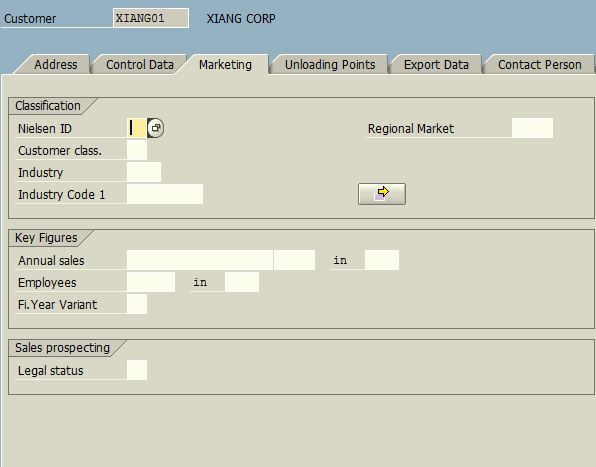
Marketing
Unloading Points
Export Data
and
Contact Person

Address Tab is self explanatory so I will skip that. Control Data tab is used when you want to establish a link between your customer and vendor. You may have customer who is also a vendor to your organization, using this tab you will be able to link a vendor code to a customer code. Apart from that you can also specify your customer's tax related details on this page.

All other tabs can be used to record general data related to the customer.

Remember General Data is common for all the Sales Areas assigned to a Customer Code.

Please go thru the screenshots below and let me know if you have any questions related to any General Data Tab.
VD01 - Create Customer - Control Data

VD01 - Create Customer - Marketing

VD01 - Create Customer - Export Data

VD01 - Create Customer - Unloading Points

VD01 - Create Customer - Contact Person

With these screenshots I finish the General Data Description. In the next session I will show you the screens related to Sales Area Data and what all can be entered there.

The Most Important point to remember is that all information entered on these tabs is common for all the sales areas of a customer. Sales Area, if you recall, is nothing but a combination of Distribution Channel and Sales Division. You can assign any number of sales areas to a Customer Master Record as per your business needs.

See you tomorrow with Sales Area Tabs.....

Read more »

SAP Sales & Distribution for End Users - Part 2

SAP Sales & Distribution for End Users - Part 2


The Sales and Distribution in SAP from end user's perspective has got 2 parts mainly.

1. Master Data
2. Order Processing

1. Master Data

SAP is a Master Data Driven System. Master Data Under Sales and Distribution module comprises of 2 major things:

A. Customers Related Master Data
B. Other Related Master Data such as Materials, Pricing, Taxes etc.


Customer Related Master Data is the central point of control for following 4 activities in SAP.
Sold to Party
Bill to Party
Ship to Party
Payer Party

These are also called partner functions in SAP. Apart from these there are certain more customer master records such as One Time Customer, Inter Company Customer, Plants etc.

To Create a Customer Master Record one has to follow the SAP Menu as shown in below screen or you can directly type XD01 or VD01 (as the case may be) in the command field on the top left corner of SAP Screen.
SAP Menu - Create Customer

When you select VD01 - Sales and Distribution, the system presents you with input screens where you can define sales related master data of a customer. When you select XD01 - Complete the system gives you option to define the company code related master data of a customer. The difference between these 2 is that in VD01 you can define a customer master from Sales Perspective only whereas in XD01 you have the complete master data creation capabilities including defining accounting links.

I will first show you 3 screens which appear after you choose VD01

On the first screen you are required to enter Customer Code (if your system is configured to generate it automatically then this may not be needed), have a look below:

Here you enter the 5 key elements related to Customer Master Record.

Account Group - as mentioned above.
Customer Code
and 3 elements related to Sales Area discussed earlier in this tutorial.

when you click the Ok Button (Tick Mark Button) or press Enter, you get to see the first view of customer master which is called GENERAL DATA. Look at the screen below:
VD01 - Create Customer - General Data Screen

On this page you have multiple tabs where you can fill required information and then click the SALES AREA DATA button (see the red outlined button in the image above). Now you will see the second view of the same customer master record as shown below:

VD01 - Create Customer - Sales Area Data Screen

As you can see, SAP gives you multiple tabs on this screen as well.

We will discuss these tabs and creation of a Customer Master Record Centrally (XD01) in the next session....

Read more »

SAP Tutorial - The SAP Menu Screen Explained Part 2

On this page I will show you the Status Bar of a SAP Screen and explain about various things on the status bar.

SAP Status Bar
SAP Status Bar

I wanted to show you this area of SAP Screen for 3 things:

1. It can tell you about currently running T-CODE, Program Name, or SAP System Name along with Client Number
2. It can give you a good idea about the time taken to complete a task in SAP
3. It tells you whether you are in INSERT mode or OVERWRITE MODE.

This small Pop up appears when you click the small icon next to where SESSION MANAGER is written on the current screen.

As described on my old posts, you can create your favorite list of frequently used programs / t-codes and that can be your default menu. Have a look at the below screen. It displays my favorite transactions menu.

SAP Favorites Menu
SAP Favorites Menu Folders

As you can see I have many favorite folders Starting with Year End and ending with Basis. I have multiple sub-folders / sub menus and transactions within these menus / folders. have a look at the screen below:

SAP Favorites Menu - Expanded
SAP Favorites Menu - Expanded View

Now it will be clear to you that SAP Menu is like a Windows Explorer tree structure where you have folders and within those folder you can organize sub folders / transactions.

In the next session I will begin the actual Sales and Distribution User Education....

Read more »

SAP SD Exam Materials

Week 1 No 1 Sales – General overview of structure and SD processes
Week 1 No 2 Sales – Master data
Week 1 No 3 Sales – Sales Process 1
Week 2 No 1 Sales – Sales Process 2
Week 3 No 1 Shipping
Week 3 No 2 Pricing
Week 4 No 1 Billing
Week 4 No 2 Cross Functional
Week 4 No 3 Solution manager
SAP SD Questions & Answers
SAP SD Sample Questions


Download:
http://sharingmatrix.com/file/4116042/SD-Exams.rar

Useful SAP SD Website: mySAP SD Tutorial
Read more »

SAP FI/SD - Credit Management/Risk Management

SAP FI/SD - Credit Management/Risk Management

A large number of outstanding receivables or bad debts can have a not inconsiderable impact oncompany performance. Using Credit Management, you can minimize your credit risk by defining a credit limit for your customers. This is especially important if you do business with customers infinancially unstable sectors or countries, or trade with countries that are politically unstable or that adopt a restrictive exchange rate policy.


Download:
http://rapidshare.com/files/336180314/fi-sd-credit-management-risk.pdf


Read more »

SCM620 Pricing in SAP SD

This SAP material will prepare you to:

Define the necessary system settings for pricing in the SAP R/3 Enterprise Sales and Distribution (SD) module.


To use this Instructor Presentation, click on the HTM document within the Classroom Presentation folder. This will open the appropriate files within the XSL Output folder. When loading the presentation at the beggining of class, refreshing the screen one time is often neccessary to bring up the Navigation contents properly.

Download:
http://rapidshare.com/files/87344431/SCM620_EN_Col32_FV_Show.zip

Read more »

SAP Pricing User Manual Material

Summary of Pricing Exercise

Tasks in the Pricing exercise, In this exercise you did the following tasks


Step 1:
Look at Document pricing procedures

Step 2:
Look at Customer specific pricing

Step 3:
Determining what procedure to use (customer or document) &Setup rule for pricing determination

Step 4:
1.Testing the new pricing procedure (creating sales order)
2.Look at price changes based on valid dates (planned changes)
3.Manually override a price (from $295 to $305)

Step 5:
1.Create a discount of $10 per unit if any customer buys over 10 units.
2.Add a customer discount of 10% if any customer buys for over $1,000.
3.Create Minimum pricing

Download SAP-Pricing-Configuration-User-Manual
Read more »

User Manual Guide for SAP SD Module

This manual contains the all information need to be understood and learnt the processes used in the area of SAP Sales and Distribution Module. In every content you will find very good introduction and instructions step by step procedures screeenshots are made available.


  • describes the concept of Master data, Pricing Condition records were used in the SAP SD module and shows the processes carried out under each content.
  • consists of all sales activities used in the Sales MTO, sales agents, sales orders, return, exports under bond and etc..
  • we learn the news most frequently used in SAP SD module.


Download SD Manual Material

Read more »

SAP SD Materials

Stop billing when the full amount is reached is SAP SD

We need to bill customer with certain amount of charges. The charges will be billed along with good sold. We maintain condition such as 1,000 USD per 10 EA that means each time customer buy 1 EA of good, we will bill them 100 USD extra charge until we bill them the full amount (1,000 USD in such case).


Since it's a condition, SAP system will continue bill customer unless we delete the condition or set the validity period.

Is there any SAP standard way that SAP system can stop billing for my situation?


The answer is: (Yadav)


Goto Transaction code: V/06, select your condition type and tick the "Condition update" check box and save it. Then, create the condition record (Transaction code: VK11) for the condition type, enter the material number, rate, validity period etc.

After filling up all your data, now click on the Menu: Goto --> Additional data. In
the "Additonal Sales data" screen , you will find a field called "Max.cond.base
value", here enter value 1000 and save your condition record. So once the
discount condition type reaches 1000 it will stop automatically.


Read more »

How to create SAP Error Message for the cancellation of paid billing document?

Can we create and SAP error message for the cancellation of paid billing document?


The scenario is:

SAP Accounting document is created upon creation of billing document. Upon
payment, document cleared is the accounting document created. There are instances wherein SAP accounting document was already cleared but our user is still able to reversed billing document. Now, i want to create an error message or user exist wherein, when a user will not be able to reverse the billing document if the SAP accounting document attached to this billing document is already paid.

The answer is yes, it's very well through SAP standard itself, you can address this SAP issue. Apply Routine 29 for the field Copying Requirements at header level in VTFL. Also Go to VOFA, select your billing type and assign routine 29 to the field "Copying Requirements". This should solve your problem.

Read more »

Free Order processing in SAP SD Material

The major objective of this exercise is to familiarize you with the order processing function and basic navigation of the ERP market share leader, SAP R/3. Although it be primarily dealt with the Sales and Distribution function within the Logistics module of the system, you should get a general understanding of how various modules are integrated.


In this user guide, the major exercise steps will be implemented using the International Demonstration and Education System (IDES) Model Company that has been set up in the R/3 System. The IDES corporate group is comprised of a number of companies that operate in various industries (automobile production, financial services, aerospace etc.) and countries.

In this guide you will complete the following steps:

1. Creating Customer Master Data
2. Creating and Processing Sales Order
2.1. Performing material availability check and scheduling delivery
2.2. Determining material price
3. Shipping
3.1. Creating Outbound Delivery Document
3.2. Picking (Creating Transfer Order)
3.3. Posting Goods Issue
4. Billing
4.1. Drafting Customer Invoices


Download Document at Order Processing Manual
Read more »

SD Material Free Download

Read more »

SD User Manual Free Download

This document contains step by step procedures required for the following processes


  • Creation of Inquiry (VA11) - A new Inquiry is created only when the authorized person at Depot receives an Inquiry from an existing or new Non Trade Customer.
  • Creation of Quotation (VA21) - Quotation is created when an inquiry is received from a customer.
  • Creation of Sales Order for a Trade Customer (VA01) - A Sales order is created when a purchase order is got from the Trade Customer
  • Creation of Sales Order with reference to a Quotation (Non-Trade customer) (VA01) - A Sales Order created when a Purchase Order received from the Customer w/out reference to a Quotation
  • Creation of Sales Order for delivery of material from another depot (VA01) - A delivery from another Depot directly to Customer shall be created on the Decision of the Depot Incharge.

Download here >> SD Guide

Posted SAPDocs.info


Read more »

SD Integration With Other Modules

Sales and Distribution integrates with a variety of other modules. Your company manages customer orders from initial request for product to the receipt and posting of customer payment as part of the Customer Order Management cycle.


To begin the cycle, your company typically enters customer orders which contain customer and product information, as well as delivery schedules. Order entry personnel use this information to advise customers about prices and delivery dates before they confirm an order. Here Sales and Distribution integrates with Materials Management for availability checking. For make to order product, Sales and Distribution integrates with Production Planning so that the product is made to satisfy the customer order requirement. Delivery and billing processing both integrate with Project Systems.

Following order entry, your company schedules and organizes customer orders for optimal delivery. Product is picked in the Warehouse Management module (noting any discrepancies from the ordered quantity) and print the shipping documents. When the delivery is released to the customer (truck leaves the dock), inventory quantities must be reduced and the general ledger must be updated appropriately. Here Sales and Distribution, by means of Posting Goods Issue, integrates with Materials Management and Financial Accounting and possibly Controlling.
After you deliver the product, an invoice must be generated and the transaction posted to the general ledger. The Financial Accounting periodically reviews the customer’s open items and posts the incoming payments when received.

SAPDocs.info
Read more »

Automatic Account Assignment in SD

During goods issue in the sales cycle, the system is usually configured to update the relevant GL accounts automatically and to create the relevant accounting documents. This customization in SAP IMG is also called material account assignment and is achieved through a number of steps as detailed below:


Determine ‘valuation level’ (Company Code or plant).
Activate ‘valuation grouping code’ and link it with the ‘chart of accounts’ for each ‘valuation area.’
Link ‘valuation class’ with ‘material type’ (FERT, HAWA, HALB, etc.) with the ‘account category reference’ (combination of valuation classes).
Maintain ‘account modification codes’ for ‘movement types.’
Link ‘account modification codes’ with ‘process keys’ (transaction/event keys).
Maintain a GL account for a given combination of ‘chart of accounts’+ ‘valuation grouping code ‘+’ account modification code ‘+’ valuation classes.’

The process of Automatic Account Determination is as follows:

Depending on the ‘plant’ entered during goods issue (GI), the ‘Company Code’ is determined by the system which in turn determines the relevant ‘Chart of Accounts.’
The plant thus entered in goods issue determines the ‘valuation class’ and then the ‘valuation grouping code.’
The ‘valuation class’ is determined from the ‘material master.’
Since the ‘account modification code’ is assigned to a ‘process key’ which is already linked to a ‘movement type,’ the ‘transaction key’ (DIF, GBB, AUM, BSX, etc.) determines the ‘GL account’ as posting transactions are predefined for each ‘movement type’ in ‘inventory management.’

SAPDOCs.info
Read more »

Stay Updated